

Smart home integration in Cairo has moved from a novelty to something most renovation clients at least ask about, but not every feature is worth the cost or the complexity. The systems that actually get used daily tend to be a small handful, namely lighting, air conditioning scheduling, and security, while a lot of the more ambitious add-ons end up ignored within a year. Knowing the difference before you renovate matters more than the technology itself.
Getting this right is one of the reasons clients bring us in for Residential Interiors rather than handling it themselves.
We plan smart home wiring into projects at the design stage now as a matter of course, because retrofitting it later is expensive, disruptive, and often visually compromised. Here’s how to think about what’s worth including and how to plan for it properly.
Planning Smart Home Integration in Cairo From the Start
Deciding what to include works best as its own short conversation early in the design process, ideally before electrical drawings are finalized. We usually walk clients through a simple list of candidate systems, rank them by how often they’d realistically be used, and then confirm which ones get wiring versus which stay as a “maybe later” with the infrastructure left in place. This keeps the decision practical rather than driven by whatever felt exciting in a showroom that week.
Lighting Control: Usually Worth It
Lighting is the feature clients use the most, by a wide margin. Scene control, meaning one setting for evenings, another for hosting, another for a quiet morning, genuinely changes how a home feels day to day, and it’s one of the few smart features that gets used long after the novelty wears off. It also pairs well with dimming, which matters in Cairo homes where natural light is intense for much of the year and evening lighting needs to compensate.
AC Scheduling: High Value in Cairo’s Climate
- Scheduling AC to pre-cool rooms before you’re home, rather than running constantly
- Zoning so unused rooms aren’t cooled unnecessarily, a real cost saver over a Cairo summer
- Remote control while traveling, useful for weekend homes on the North Coast
- Integration with humidity sensors in coastal properties where that matters more
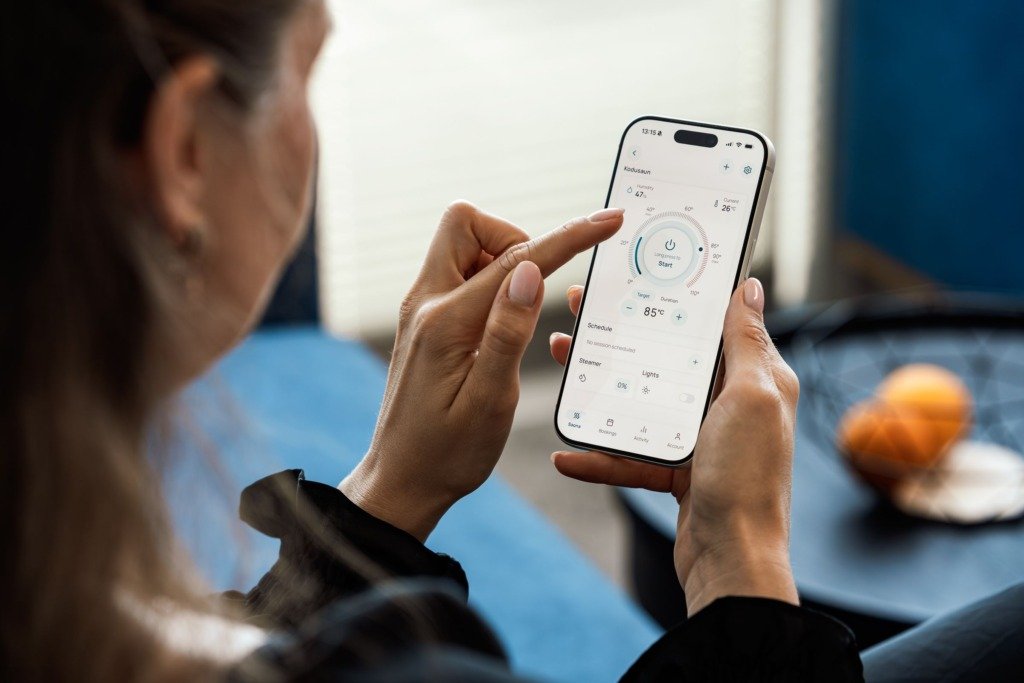
Given how much of a typical Cairo household’s electricity bill goes to cooling, AC scheduling is one of the few smart features that can genuinely pay for itself over a few summers, not just add convenience.
You will find a related discussion in A Seasonal Maintenance Checklist for Your Cairo Home, which covers similar ground from a different angle.
Security: Worth Prioritizing Over Novelty Features
Cameras, smart locks, and entry monitoring are consistently used because they address a real, ongoing concern rather than a passing convenience. Unlike some other systems, security features tend to get more use over time, not less, as families settle in and start relying on them, particularly for compound homes in New Cairo or Sheikh Zayed where residents want to check on the property while traveling.
Smart home integration should earn its place through daily use, not novelty. If you wouldn’t use it weekly, it isn’t worth wiring for first.
What’s Usually a Novelty Rather Than a Necessity
Voice-controlled curtains, app-controlled coffee machines, and elaborate whole-home audio systems get a lot of showroom attention but often go unused within months, mainly because they solve a problem that wasn’t really there. If a feature doesn’t save time, save money, or address a genuine daily frustration, it’s worth being honest about whether it’s a real priority or just an appealing idea at the planning stage.
Why Wiring Should Be Planned During Renovation
The real cost of smart home integration isn’t the devices, it’s the wiring and infrastructure behind them, which is dramatically cheaper to install while walls are already open than to retrofit later. Even if you’re not ready to commit to every system at handover, running the conduit and low-voltage cabling during construction keeps the door open to add lighting control, additional cameras, or AC zoning down the line without cutting into finished walls. It’s also worth checking that whatever system you choose works reliably with local internet providers and doesn’t depend entirely on a cloud service that could change its terms later. A system that stops working during a Cairo power flicker until it reboots and reconnects is a common complaint worth asking installers about directly before committing.
What Changes the Brief for Smart Features
Who lives in the home
A household with older relatives, young children or live in help needs controls that everyone can use without a phone. A wall switch that always works matters more than an impressive app. Ask who will actually use each feature, and design for the least technical person in the house.
Apartment or villa
An apartment usually needs a compact system that sits in one cupboard. A villa spreads over more floors and outdoor areas, so it needs more careful planning of where signals and cables run, and where equipment will be kept cool and accessible.
Planning Order: Where Smart Features Fit
Agree the list before the drawings
Lighting zones, switch positions, curtain pockets and ceiling layouts all depend on which features you keep. Settling the list first means the electrical drawings are done once, not redrawn after every showroom visit.
Test before the walls close
Every cable run should be labelled and tested while the wall is still open. Take photos of the routes, so that anyone working on the home later knows where the cables sit before they drill.
Materials, Heat and Dust
Keep equipment cool
Routers, hubs and controllers produce heat, and Cairo summers do not help. Give them ventilated space, not a sealed cupboard, and keep them away from direct sun and from kitchen steam.
Choose finishes that suit the devices
- Wall plates and keypads in finishes that match the switches elsewhere in the room
- Matte surfaces that hide dust and fingerprints on touch panels
- Sensors placed where curtains and furniture will not block them
- Speaker and camera positions agreed against the ceiling and joinery design
Comparing Systems and Quotes
Open standards or a closed ecosystem
A system built on open standards lets you replace one part without replacing everything. A closed system can be simpler to start with but ties you to one supplier. Ask who will support the system after handover and what happens if the installer is no longer available.
Compare what each quote covers
Quotes often differ in whether they include programming, the control hub, extra sensors, testing and training for the household. Ask for each item to be listed and compare line by line, not by the total alone.
Lead Times and What to Prepare
Control panels, dimmers and specialist equipment are often imported, and they can take longer to arrive than ordinary fittings. Order early, confirm that spare parts are available locally, and make sure the equipment is on site before the ceilings are closed. Before the first planning conversation, it helps to have the following ready.
- A list of the devices you already own and want to keep
- Your daily routines, such as how the home is used in the morning and the evening
- The rooms where you want manual control kept as a backup
- Details of your internet provider and where the line enters the home
Frequently Asked Questions
Can I add smart features after moving in?
Yes, some devices work wirelessly, but wiring is far easier to plan before the walls close. Leave conduit and a spare route where you can.
What if the internet goes down?
Basic controls, such as lights and switches, should keep working locally. Ask the installer to confirm exactly which functions depend on the internet.
Do smart features suit a rented home?
Usually only the plug in kind, which you can take with you. Permanent wiring is better kept for a home you own.
Can I manage the system while abroad?
Most systems allow remote control through an app, which suits owners who travel. Keep a trusted person at home who can reset equipment if needed.
Decide on your priority systems before construction starts, not after. Wiring is cheap during renovation and expensive to add once walls are closed.
We plan for this on every relevant project through Residential Interiors, including the infrastructure built into Al-Shorouk Office Renovation so future systems could be added without reopening finished walls. If cost is what’s holding you back from deciding how much to invest here, How Much Does an Interior Designer Cost in 2026, and What Changes the Fee is a useful reference for where smart home features typically sit within an overall budget.
Free guide
Working With an Interior Designer: What to Expect
Leave your details and we will email you the guide on this subject straight away.
One guide, no repeat mailings.
Your guide is on its way
Check your inbox in a few minutes. If it is not there, look in your spam folder.